
Can a Professional Headshot Be a Selfie
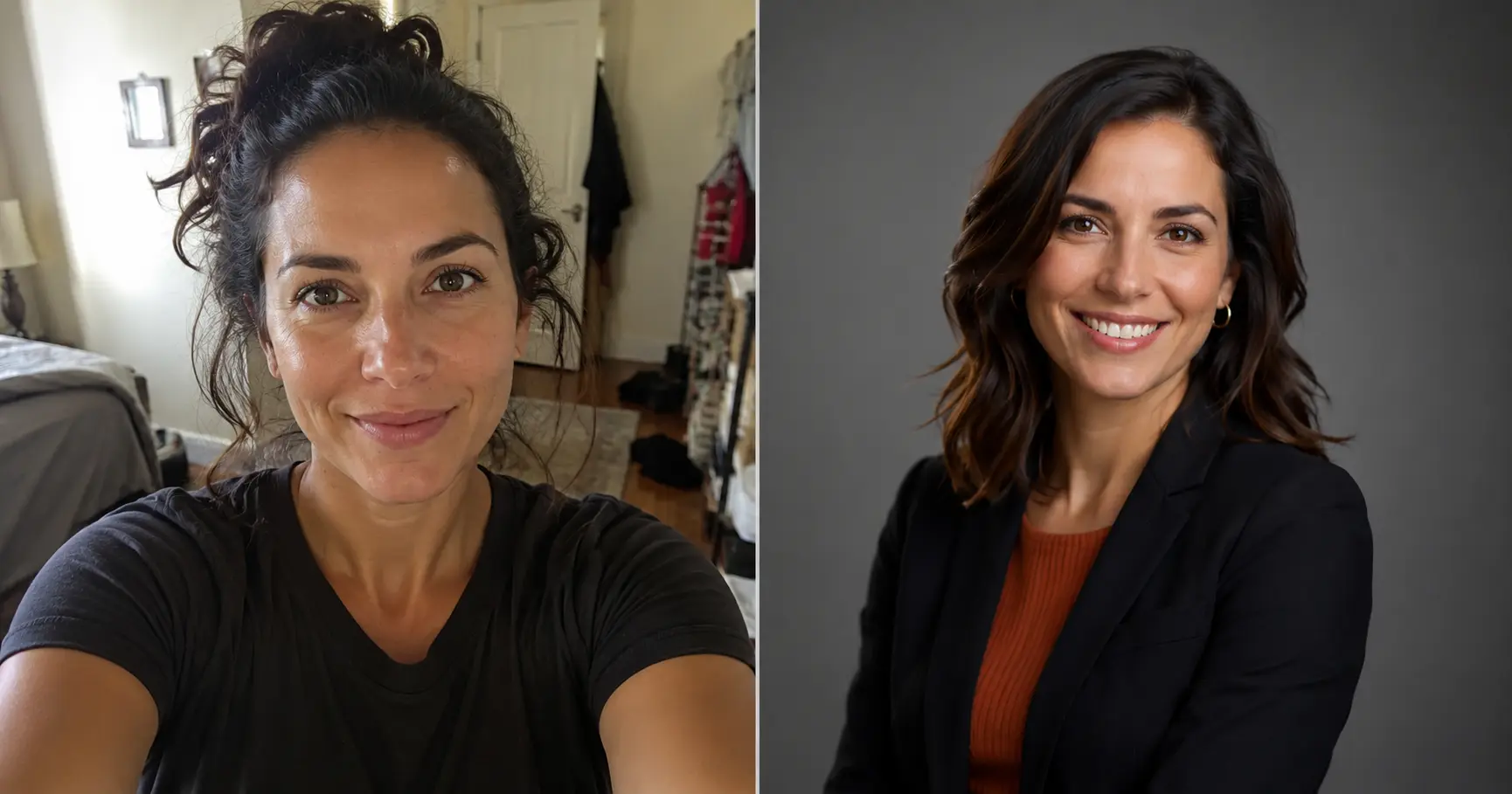
A selfie can work as a professional headshot only when it clears a specific set of hurdles: controlled lighting, a clean background, proper framing, and sharp resolution. Most phone snapshots taken at arm's length don't clear those hurdles—but a well-planned shot, or an AI-enhanced version of one, often can.
What makes a headshot "professional"
The word "professional" describes a result, not a method. A headshot earns that label when it:
- Puts your face in sharp focus with even, flattering light
- Uses a neutral or clean background that doesn't compete with you
- Frames your head and shoulders with appropriate cropping
- Shows a natural, confident expression
- Looks consistent with how you present yourself in person
A studio photographer achieves this with lighting equipment, backdrop paper, and a dedicated camera rig. You achieve it by controlling those same variables—just with different tools.
Why most selfies fall short
The typical selfie fails on three fronts:
Lighting. The front-facing camera has no control over ambient light. Overhead room lighting creates shadows under your eyes and nose. Window light from the side can blow out half your face. Inconsistent lighting is the single fastest signal that a photo was not taken intentionally.
Background. A selfie captures whatever is behind you in that moment—a kitchen, a car headrest, a bathroom mirror. A distracting background pulls the viewer's eye away from you.
Angle and distortion. Holding a phone at arm's length introduces wide-angle distortion that slightly exaggerates the nose and flattens the face. The closer the camera, the more pronounced the effect. Rear cameras have better optics, but selfies are almost always taken with the front camera.
None of these are insurmountable—they just require intention.
How to take a selfie that actually looks professional
If you want to DIY a headshot at home, the single biggest upgrade is a tripod (or anything that holds the phone steady at eye level) combined with a large window as your light source. See our full walkthrough in how to take a great headshot at home for step-by-step instructions.
The short version:
- Use natural window light. Face a window with your back to the room. Overcast days produce the most even, shadow-free light.
- Use the rear camera + self-timer. Set a 3–10 second timer, step back, and let the phone shoot on its own. Rear cameras produce noticeably sharper images.
- Choose a plain background. A clean wall or a door a few steps behind you is enough. Distance between you and the background helps blur it.
- Frame head and shoulders. Leave a small amount of space above your head. Crop tight enough that your face reads clearly at thumbnail size.
- Take many shots. Expressions vary. Shoot 20–30 frames across a few minutes and pick the best two or three.
For a deeper look at the technical side, how to take a professional headshot covers camera settings, angles, and what to wear.
When AI closes the remaining gap
Even a well-set-up selfie may have a distracting background, uneven color grading, or a casual vibe that doesn't match the professional image you need. AI headshot generators solve this by using your uploaded photo as a starting point and rendering a fully styled, studio-quality portrait—right down to lighting, attire, and background.
FastHeadshot's AI generator is designed specifically for this workflow: upload a clear selfie, choose a style, and get back a polished headshot in under a minute. It handles background replacement, lighting correction, and professional framing automatically.
This matters most when:
- You need headshots quickly for a job application or LinkedIn update
- You don't have budget for a studio session right now
- You want multiple looks (formal, casual, different backgrounds) without scheduling multiple shoots
For context on how AI results compare to traditional photography, AI vs traditional headshots breaks down the trade-offs honestly.
Industry expectations: how high is the bar?
The threshold for "professional enough" varies by context:
| Use case | What's typically acceptable |
|---|---|
| LinkedIn profile | High-quality selfie or AI headshot — fine for most roles |
| Resume / CV | Same as LinkedIn; clarity and professionalism matter more than method |
| Company team page | Check with your employer — many now accept AI headshots |
| C-suite / board bio | Traditional studio photography still preferred in many organizations |
| Speaking / media kit | Studio or AI at high resolution; consistency with other brand assets matters |
If you're unsure where your role falls, err on the side of higher quality. A sharp, well-lit photo signals that you take your professional image seriously, regardless of how it was made.
FAQ
Can I use a selfie for LinkedIn?
Yes, if it meets the quality bar: clear lighting, clean background, sharp focus, and a professional expression. A low-effort bathroom mirror selfie will hurt more than help. If your best selfie doesn't look polished, an AI headshot tool is a cost-effective upgrade—see where to get a professional headshot for LinkedIn for all your options.
What's the difference between a selfie and a professional headshot?
The key differences are controlled lighting, a neutral background, proper framing, and intentional composition. A professional headshot—whether from a studio or an AI tool—is created with all of those in mind. A typical selfie is not.
Do recruiters care if my headshot is a selfie?
Most recruiters focus on whether the photo looks professional, not how it was taken. A well-executed selfie or a high-quality AI headshot is indistinguishable from a studio shot to most viewers. What matters is that the photo looks polished, clear, and confident.
Can AI really make a selfie look like a studio photo?
Modern AI headshot tools can convincingly replace backgrounds, correct lighting, and render a consistent, studio-quality aesthetic. The output is generally indistinguishable from a professional studio shoot for typical online use. The main limitation is resolution—if you need a large print, a high-resolution studio camera still has an edge.
What's the best aspect ratio for a professional headshot?
Most platforms use a 1:1 square crop for profile photos, but 4:5 and 2:3 portrait ratios work well for resumes and team pages. See our guide to choosing the right headshot aspect ratio for platform-specific recommendations.
Ready to transform a selfie into a polished headshot? Try FastHeadshot free—upload one photo and get back a professional result in seconds.
Related articles
Headshot Aspect Ratio Guide: Best Ratios for Every Use
Learn which headshot aspect ratio to use for LinkedIn, websites, resumes, and social media. Quick-reference table and practical cropping tips included.
AI Headshot Prompts: Write Better Prompts for Pro Results
Learn the exact 4-part formula for writing AI headshot prompts that produce studio-quality results. Includes copy-paste examples for every industry.
AI vs Traditional Headshots: Cost & Quality Compared
Comparing AI headshots vs traditional photography on cost, quality, speed, and professional perception — so you can choose the right option for your needs.